SLJ : Shell Ebration – Step It Up

For this SLJ activity, I got to create my very own seashell museum using Google Slides! I picked four awesome shells: Scallop, Alternate, Gulf Oyster Drill, and Paua. First, I found pictures of each shell online and added them to my slides. Then, I wrote a fun fact about each shell and included where you can find them. If I couldn’t find a location, I described how to look for it instead. To make my presentation look even cooler, I changed the fonts too! The Task was awesome and amazing.


SLJ : Shell – ebration

Today, we had a fun task to create art with shells! If you had any real shells, you could use those, but I decided to use Google Drawings and found pictures of shells online. I made a happy teddy bear that loves warm hugs. To create my teddy, I used different shapes and images I found on Google. It was really cool to turn something as simple as shells into a cute piece of art!

Here is my work / a shell teddy bear.

SLJ : Aquatic Animal

For the SLJ activity, I was happy to create my favorite aquatic animal, the turtle! Turtles are special because they can live for a very long time and have hard shells to protect them. I used Google Drawings to make my turtle picture. First, I found a turtle image online and added it to my drawing. Then, I used the draw tools and pen to choose my colors for the shell and the water. I even added the word ‘Turtle’ to show what my drawing was about. I really enjoyed this activity because it’s about aquatic animals.


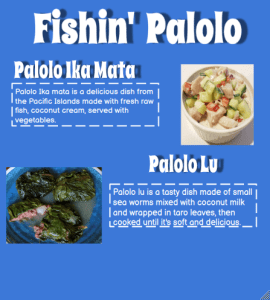
SLJ : Palolo Menu

Today’s Step it up task was to make a Palolo menu, It was amazing and fun to do. For this task i had to get different dishes that have Palolo/Sea worms. I enjoyed looking for dishes with Palolo, I picked Palolo Ika Mata, and Palolo Lu. The thing that was interesting about this task it was looking for the things about the dishes of Palolo and creating a menu name for 2 dishes with Palolo/Sea worm


SLJ : Mosaic Art / Bottlenose Dolphin

In this fun project, our task was to create a colorful mosaic inspired by one of the fascinating marine animals found in Africa. To begin, I turned to Google and searched for a picture of a marine animal, and after looking through many options, I decided on a Bottlenose Dolphin because they are so playful and beautiful! Next, we needed to use Google Drawings to upload the picture of the dolphin I chose. Once the picture was in my drawing, I used the polyline tool, which allowed me to trace triangle shapes over the dolphin’s image, creating a cool layered effect. It was really exciting to see the picture transform into a mosaic!

SLJ Among Us Sea Safari – Step it up

The Summer learning journey today’s task was to make a copy of a slide show and then edit it. It was Among Us themed so I loved it. We had to ask questions and then put the answers in the boxes and then we had to like get the small box and then put it over the button so when you guys play it you guys do it anyways i love this costume so much i reminded me when me and my sister’s played Among Us together oh yeah and we have to make names for the Among Us characters/players.

Link

I am Butterflies Poem


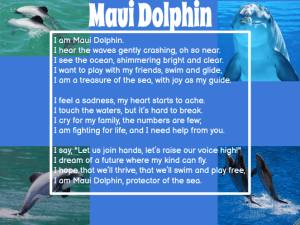
For the Kick-Start task, we had to copy a Google drawing and write an “I am” poem about a sea creature we chose. I picked a sea creature and found it a bit tricky because I needed to gather interesting facts about it. There were so many facts to choose from, but I wanted to pick the most exciting ones that would make my poem really cool. I learned a lot about my sea creature and how it lives in the ocean. Each fact helped me think of awesome lines for my poem. In the end, I felt proud of the poem I created and I can’t wait to share it with you all! Writing about the sea creature was a fun challenge that helped me learn more about the amazing life underwater.


Adobe Express – Action Figure

This week we are exploring Adobe Express. For this task we got to make ourselves into an AI Action Figure. I enjoyed writing about what the doll likes and what’s their hobby. Here is my work